
Writing / Measurement & applied AI
Is AI actually saving time on your monthly marketing reports?
Measure the work required to finish the report, including the checking, corrections and handoffs after the first draft.

A draft arriving sooner is useful. A finished monthly report still needs reliable figures, supported explanations and whatever review the team requires before it reaches its readers.
To measure AI reporting time savings, compare the human effort and turnaround required to finish reports of similar scope and quality. Include preparation, checking, corrections and approval. Record drafting time separately so you can see where a change occurred.
The worksheet accompanying this guide summarises that comparison from your own activity records. Start with a recurring report you already own. You do not need a claimed saving or a financial return to begin.
Choose the report you are comparing
Write down the report's purpose, reporting period, data sources, channels or properties covered, required analysis and recipients. Name the person who can accept it, and agree what acceptance means.
For a monthly marketing report, that might mean checked figures, consistent comparison periods, explanations supported by campaign activity, and recommendations that follow from the evidence. A polished summary with unresolved source questions would still need work.
Use the same start and finish rules for both workflows. For this exercise, start when report preparation begins, including collecting or chasing inputs. Finish when the required reviewer has accepted the report and it is ready for its intended distribution. If actual distribution matters, record that separately rather than silently changing the endpoint.
Keep a reference description of the current workflow, including any automation it already uses. Your baseline is the process you actually use. It need not be entirely manual.
Record each report's scope and workflow version before work begins. Compare reports that belong to the same scope group. A client presentation with additional analysis and an internal summary are different jobs.
Separate human effort from turnaround
- Human effort
- The combined active time people spend producing the report. Include the analyst, reviewer and anyone contributing necessary work.
- Turnaround
- The elapsed time between your agreed start and finish. It includes unattended processing, queues and waiting within that interval. Use full dates, times and a consistent time zone; calendar elapsed time includes nights and weekends. A business-hours measure needs its own explicit working calendar.
Add people's active minutes to measure effort. Subtract the report's start timestamp from its finish timestamp to measure turnaround. Do not calculate turnaround by adding activity durations: work can overlap.
Consider this teaching example. An analyst checks a source export while a colleague reviews the previous section. Both people's work counts towards effort, even though it happens at the same time. The report's elapsed clock passes through that interval once.
The analyst then requests a missing campaign explanation and moves to another project. The report is waiting, but that other project's work does not belong in this report's effort. If the analyst returns to chase the response, record the chasing as active work. An unattended AI run also uses elapsed time without necessarily using human effort; prompting, monitoring and checking do use effort when someone is actively doing them.
Keep waiting reasons for diagnosis. Overlapping waits cannot simply be added into a total delay.
Record work as it happens
The worksheet takes stage totals for each report. Keep the underlying activity notes separately in a shared log or your existing time-recording system. Use a common report identifier, with an internal label rather than confidential client details.
The activity record
Keep a record you can compare.
Establish the context before work begins. Then record the time and what happened at review.
01 / Context
Identify the work
Start with the reporting period, scope group and workflow version. Give each contributor a stable label and record their role, so every entry can be traced to the right person and comparison.
Assign each activity to one stage: preparation, drafting, checking, corrections, stakeholder revisions or release preparation.
02 / Time
Separate work from waiting
Record active minutes spent on this report. Split interrupted work into separate entries where practical, and never count the same person’s full overlapping interval against two activities.
Keep activity start and end timestamps, plus the report’s overall start and finish. These help reveal overlap; they do not automatically measure active work. Note waiting dependencies, such as an export, campaign explanation or reviewer availability, and record active chasing separately.
03 / Review
Preserve the outcome and the gaps
Record material changes, including corrections and changes in scope, and whether review accepted the report, requested revisions or left an issue unresolved.
Explain missing or estimated records. Leave an unknown duration blank. Enter zero only when you know no active effort occurred.
Use one stage per activity. If checking discovers a wrong comparison period, log the checking once, then put the work to fix it under corrections. Do not also add that correction time to the original checking entry.
Before entering stage totals in the worksheet, reconcile missing entries with contributors. Check timestamps, plausible active durations and simultaneous entries from the same person. Different people working together legitimately contribute separate effort. These checks require your activity notes; aggregate totals cannot reveal duplicated intervals.
Transfer the checked active minutes into the corresponding stages. Enter setup effort separately, then enter elapsed time calculated from the agreed report timestamps. Record acceptance and comparability honestly. If a stage total is incomplete, leave it blank and retain the reason in your notes. A partial total would understate the work.
Record setup and training separately from recurring production. That keeps the learning cost visible without making every later report appear to require the same setup again. The National AI Centre includes training, preparation and ongoing oversight in its guidance on assessing AI costs[1].
Keep review and changes in scope visible
Agree the quality checks before the comparison. Check figures against the intended sources, verify periods and metric definitions, and distinguish supported explanations from possible causes. Record material corrections, unresolved issues and whether the report passed its first review.
Acceptance is a recorded decision by the responsible reviewer. A draft being saved or an AI saying it has finished does not establish that decision.
Here is a second teaching example. A reviewer returns a draft because a comparison uses the wrong period. Keep the report open, record the correction and subsequent review, then record the eventual acceptance. The first draft remains a milestone; it is not the finish.
Now suppose the reviewer also requests analysis of another property that was outside the agreed scope. Record that request as a scope change and distinguish its work from fixing the period error. The report's actual total still includes both. Mark the completed report as a changed comparison rather than presenting its total against an unchanged baseline as a clean AI effect.
If the original-scope work can be separated reliably, retain that breakdown with an explanation. If it cannot, keep the observation and compare a later report with the revised scope. Do not guess which minutes to remove to make the result comparable.
Compare what the records support
For comparable completed reports, calculate the difference in total human effort and, separately, turnaround. Look at stage totals to locate the change. A positive baseline-minus-current difference means less time on that measure; a negative difference means more.
Keep the underlying observations visible. Missing reviewer time makes an effort total incomplete, even if start and finish timestamps establish turnaround. An unaccepted report has no completed turnaround yet. Neither should appear as a finished saving.
Repeat the comparison across reporting cycles. Note changes in campaign complexity, source readiness, staffing, templates and reviewer availability. Where feasible, keep a comparable group using the existing workflow. Microsoft recommends baselines, comparison groups and quality measures in its value-measurement guidance[2]. This is vendor guidance, not proof of an effect in your team.
A before-and-after observation cannot isolate AI from everything else that changed. METR's developer research describes how task selection and concurrent work complicated its own measurement. That study concerns software developers, but its methodological limitations[3] are a useful reminder to examine who did the work and which tasks entered the comparison.
Decide what to change next
Use the pattern in the records to choose a specific action.
Less drafting, more corrections
Inspect the recurring defects and revise the inputs, instructions or review process before expanding use.
Less effort, similar turnaround
Investigate the waiting dependencies. Faster production may free capacity without bringing the delivery date forward.
Faster turnaround, similar effort
Identify whether parallel work or quicker handoffs explain the change. Earlier delivery may still matter, but it is a different benefit.
A change in scope or quality
Describe the change explicitly and establish a comparable reference before claiming a saving.
If effort is released, record what it is used for. Reduced labour time can create capacity without reducing payroll or other expenditure. The National AI Centre also recommends tracking where released time goes when assessing AI's value[1].
Start the next report with the scope, reviewer and timing boundaries already agreed. At acceptance, you should be able to explain which work changed, whether the report met the same standard, and what the team should adjust next.
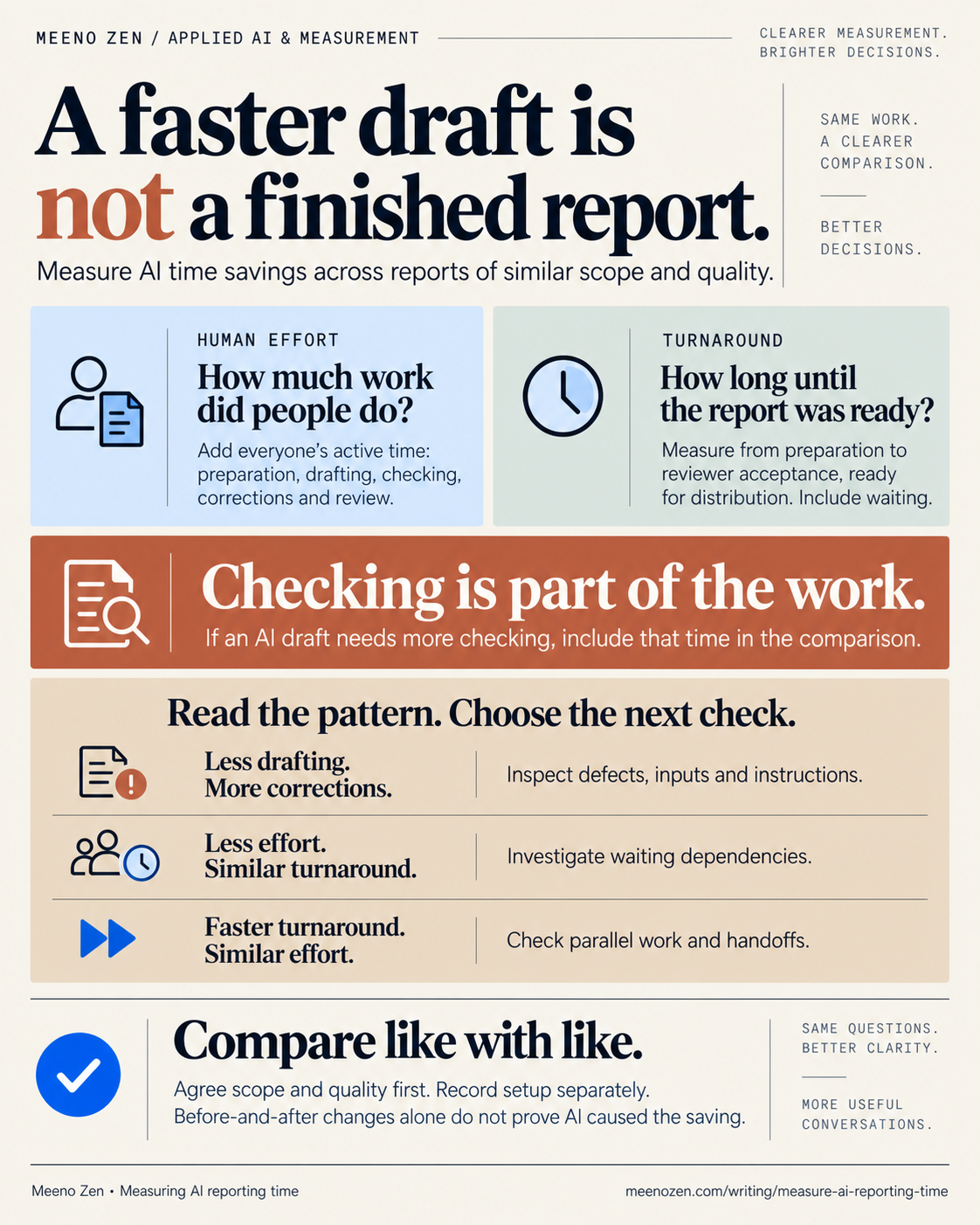
Read the infographic as text
A faster draft is not a finished report. Measure AI time savings across reports of similar scope and quality.
- Human effortHow much work did people do?
- Add everyone’s active time: preparation, drafting, checking, corrections and review.
- TurnaroundHow long until the report was ready?
- Measure from preparation to reviewer acceptance, ready for distribution. Include waiting.
- CheckingChecking is part of the work.
- If an AI draft needs more checking, include that time in the comparison.
Read the pattern. Choose the next check.
- Less drafting.
More corrections. - Inspect defects, inputs and instructions.
- Less effort.
Similar turnaround. - Investigate waiting dependencies.
- Faster turnaround.
Similar effort. - Check parallel work and handoffs.
Compare like with like. Agree scope and quality first. Record setup separately. Before-and-after changes alone do not prove AI caused the saving.
Meeno Zen. Based on this article: Measuring AI reporting time.
Your reporting record
Compare the whole job.
Enter measurements for one baseline report and one AI-assisted report. Record active work across everyone involved. Keep turnaround separate.
Entries stay in this page and disappear when you reload or leave. Download a PDF snapshot or a CSV to keep them. Use report labels instead of confidential details.
All time fields use minutes. Leave unknown values blank. Enter 0 only when no work or time was required. For each stage, add each person’s active minutes, including prompt preparation and AI supervision. Assign each activity to one stage only.
What your entries show
Record the shared standard, confirm comparability and mark both reports accepted before interpreting a difference.
How to record and interpret the work
Start with a log
Keep a working log of role, activity, active minutes and start/end times. Sum active minutes into the matching stage above. Keep setup and training outside recurring stage totals. Capture missing entries and exceptional work in the notes. The CSV is a report-level summary, not an individual activity log.
When work overlaps
If an analyst checks sources while an editor revises the narrative, record both people’s active work in their respective stages. Their overlapping work contributes to human effort. Measure elapsed time once from the report’s start to acceptance; do not add their separate durations together to calculate turnaround.
When a report is rejected
A completed draft with unsupported conclusions is still pending. Record the first-review outcome, add the correction and second-check work to the relevant stages, and continue the turnaround clock until acceptance. If the scope or standard changes, record that change and choose another comparable report before interpreting a saving.
Choose the next action
If drafting falls but checking rises, inspect the checks and corrections before expanding. If effort falls while turnaround holds steady, investigate waiting or approval delays. If quality is unresolved or records are incomplete, finish the evidence first. Repeat across comparable reporting cycles before drawing a general conclusion. Recovered capacity is not automatically a cash saving.
Takeaway to keepOne image download
Sources3 references
Evidence & further reading
Numbered references in the article point to the documents below. Each title opens the original source.
- 01
National AI Centre
Measuring return on investment in AI - 02
Microsoft Learn
Measure and report value - 03

How I connect stakeholder questions, measurement design and agency delivery so reporting leads to a useful next step.
Explore the measurement case