
Writing / Applied AI & systems
What OpenAI's Agents API actually gives you
OpenAI can run the agent harness. Your team still owns the question, the tools and the decision about what happens next.

OpenAI’s Agents API gives an application access to the managed harness behind Codex. OpenAI runs the agent infrastructure; your team still defines the question, connects the permitted tools and decides which results or actions need review[1]. The architecture choice is how much of that runtime you want to operate yourself.
An agent is a controlled loop around a model. The model proposes the next step. The surrounding runtime decides what it is allowed to do, runs a tool, returns the result and continues until the task reaches a defined stopping point. A swarm of sub-agents is one possible arrangement inside that loop. It is not the definition of an agent.
That distinction matters because the interesting work is usually outside the sentence the model writes. It is in the evidence it can inspect, the actions it can take, the state it carries, the permissions around those actions and the checks that decide whether the result is ready for a person.
Three choices, with different runtime owners
- Managed Agents API
- OpenAI operates the Codex harness, including sessions, orchestration, context compaction and recovery. Your application provides tools and chooses the execution environment[15]. This is a distinct API, with agent sessions, rather than a loose name for the products below.
- Responses API
- The lower-level model-and-tool interface. A team calling it directly owns more of the application’s loop and control flow[2]. It is useful when you need to assemble those choices yourself.
ChatGPT Workspace Agents are another product, for shared team workflows inside ChatGPT. Similar concepts do not give an API application the same identity, setup or permissions[4]. Choose the product before borrowing its configuration advice.
A paid-search investigation, with a boundary
Imagine a request: “Investigate the fall in paid-search enquiries last week and prepare a report for the performance meeting.” The following is a proposed architecture, not a deployed Meeno system and not a result from real data.
Define the contract.
Record the site, channel, local-time window, enquiry event, comparison period, source systems and the decision the report will support.
Give the lead agent read-only tools.
It can query approved analytics, retrieve the release log and read the measurement runbook. It cannot edit tags, publish a campaign or change a dashboard.
Let code reduce the evidence.
A programmatic call groups events by day, checks the event definition and writes a small evidence file with filters and freshness attached.
Delegate only when the evidence requires it.
A telemetry specialist can inspect a release change or a data-quality specialist can reconcile a missing day. Each returns a structured finding, uncertainty and source reference.
Assemble a report.
The lead agent separates observed change, possible explanations, evidence still missing and suggested next checks. It does not call a correlation a cause.
Pause for the meeting owner.
A human accepts the scope and decides what action to take. The run ends with a shareable report and its evidence bundle.
The interesting part is the contract and the stop condition. The agent is allowed to investigate, not to turn an uncertain explanation into a production change. That boundary makes the result easier to review and the next run easier to improve.
Untangle the names before you design the system
- Model
- The language model proposes text, a tool call or a next decision from the instructions and information it can see. It is the reasoning component, not the whole application.
- Agent
- In the Agents SDK, an agent is an LLM configured with instructions, tools and optional runtime behaviour such as handoffs, guardrails and structured output[3]. In plain language, it is a goal-directed participant inside a run.
- Harness
- The software layer that runs the session around the model. It turns a proposed tool call into an actual call, carries state between turns, applies permissions and decides how the run continues. “Harness” is a useful architecture term; it is not a synonym for the model.
- Application
- The product and business process that own the agent. It defines who may start a run, which data and tools are available, what needs approval and where the final artifact goes.
- Orchestration
- The control flow between turns, tools and agents. It can be ordinary program logic, a manager calling specialists as tools, or a handoff that transfers the conversation to another agent.
A helpful test is to ask which layer would change if the model changed. If the answer is “the reasoning quality”, you are talking about the model. If the answer is “what can run, what can be recorded or who must approve it”, you are talking about the harness or application.
The loop is the product
A normal chat has a simple shape: input, model response, end. An agent run can repeat the middle. The model receives a goal and the available tools, proposes an action, waits for the result and uses that result to decide what to do next. The managed Agents API carries that run across turns in a durable session[15]. In an SDK application, Runner coordinates the turns; with direct Responses calls, your application supplies more of that control flow.
One run, made visible
The model proposes. The runtime checks.
Every step should leave enough evidence for a reviewer to understand what happened.
01 / Goal
Start with a question and a boundary.
State what the run must produce, which sources are in scope and what it must never change. A request to “investigate the drop” is incomplete until the population, period and acceptable evidence are named.
02 / Choice
Let the model choose among known actions.
The model can decide whether it needs a query, a file search, a calculation or a specialist. It should choose from tools the application has deliberately exposed, not discover unlimited authority.
03 / Result
Return an observation, not a promise.
The tool runs and returns data, an error, a file or a permission decision. The harness puts that result back into the run so the next decision is grounded in what actually happened.
04 / Exit
Stop on a result, a question or a review gate.
A run can finish with a report, ask for missing information, pause for approval or stop because the evidence conflicts. “Keep going until it feels done” is not a control condition.
What the surrounding layers do
Several layers are easy to collapse into one vague word. They are related, but they solve different problems.
- Tools
- Tools are the actions and observations an agent may request: search, read a record, run code, call a function or edit a file. A tool description tells the model how to ask; the application still owns the implementation and permission. The SDK supports custom function tools as one application-side option[11].
- Model Context Protocol (MCP)
- MCP is a protocol for exposing tools and context from another application. It is a connector surface, similar to a standard port. It does not make a model intelligent, turn a server into an agent or remove the need to trust the server and limit its credentials[6].
- Skill
- A skill is reusable procedure and supporting material that an agent can load when it needs a capability. It can explain a runbook, a file format or a house method. It is an instruction bundle, not another model and not a permission grant[7].
- Sandbox
- A sandbox is an execution boundary for files, commands and packages. The managed API can use an OpenAI-hosted sandbox, provisioned and managed by OpenAI[16]. Separately, the Agents SDK describes a SandboxAgent, a manifest and a live sandbox session, with capabilities such as filesystem access, shell, skills, memory and compaction[8]. It can reduce blast radius when configured well; the word alone is not a complete security review.
- State and sessions
- State is the information needed to continue a run. Managed agent sessions can be continued or resumed[15]. SDK sessions can retain conversation history across runs, while server-managed continuation is a separate mechanism[9]. Neither should be treated as a governed source of truth. Keep important evidence in explicit records or artifacts.
- Artifacts
- An artifact is a durable output such as a filtered data file, an investigation record or a report. It gives the next step something inspectable to receive instead of forcing every intermediate detail through the model's conversation.
- Tracing and guardrails
- In the SDK, tracing records generations, tool calls, handoffs and guardrails. Input, output and tool guardrails can block or reshape a run at defined points[10]. These controls improve visibility and stop conditions; they do not prove that the underlying answer is correct.
Visual reference
Meeno Zen’s conceptual agent-loop diagram. These boxes describe responsibilities, not the managed API’s execution order.
Open full-size infographic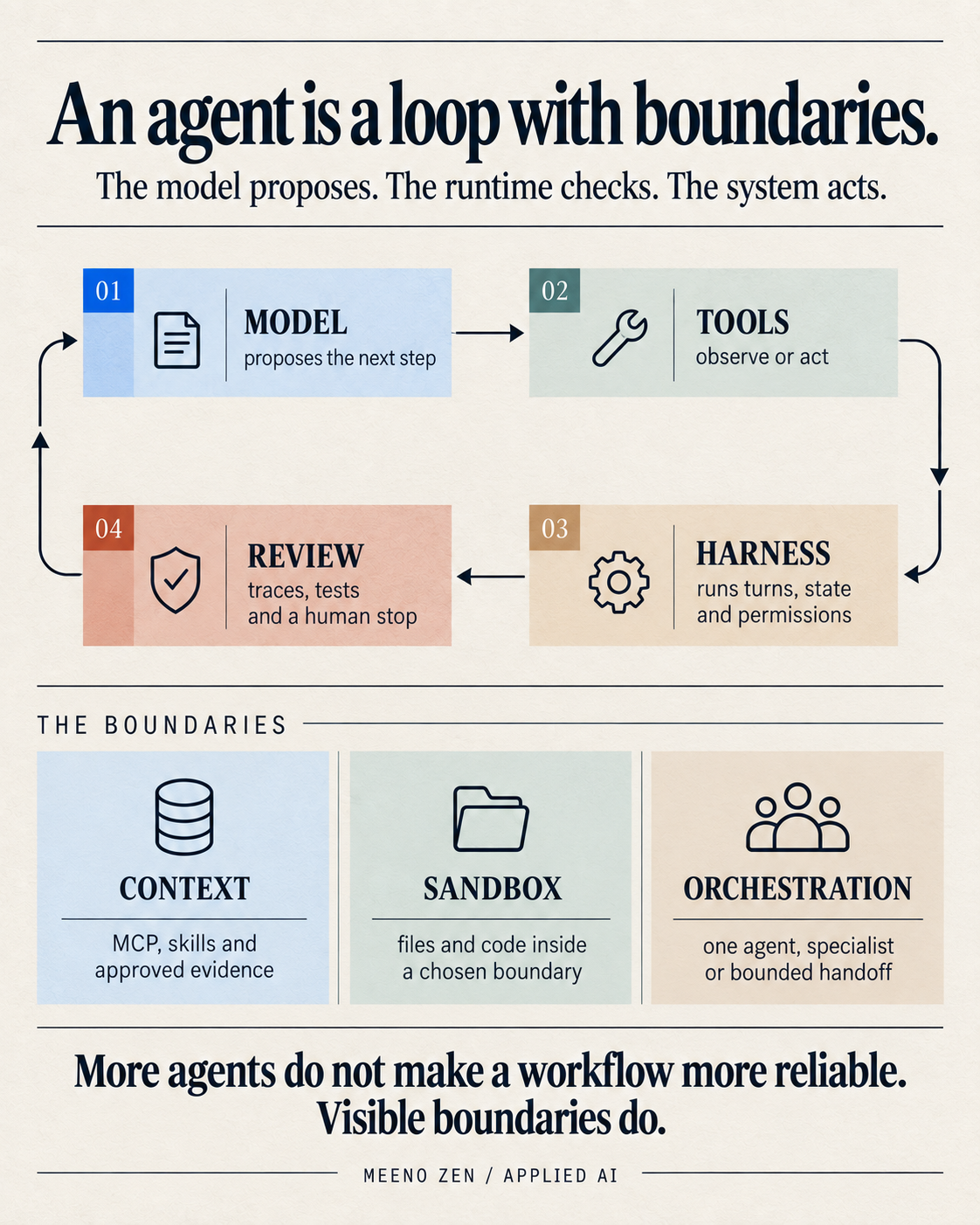
Read the infographic as text
An agent is a loop with boundaries. A model proposes. The runtime checks. The system acts.
- 01 / ModelProposes the next step.
- The language model chooses a response or an available action from the goal and evidence in scope.
- 02 / ToolsRead, calculate or act.
- Tools return observations or perform a bounded operation the application has exposed.
- 03 / HarnessRuns turns, state and permissions.
- The runtime carries the loop and applies the rules around what can happen next.
- 04 / ReviewTraces, tests and a human stop.
- Visibility, guardrails and approval decide whether the result is usable.
- ContextMCP, skills and approved evidence.
- Connectors and reusable instructions add the context the agent needs without pretending every source is trusted.
- SandboxFiles and code inside a chosen boundary.
- Code and files run inside an execution boundary with explicit capabilities.
- OrchestrationOne agent, specialist or bounded handoff.
- Keep one owner when possible; delegate only when the subtask and return format are clear.
More agents do not make a workflow more reliable. Visible boundaries do.
The artwork’s closing line is a design principle: visible boundaries support review, but neither boundaries nor extra agents guarantee reliability. This visual is Meeno Zen's synthesis of the article's cited documentation and the OpenAI announcement. It is an explanatory model, not a vendor diagram or a measured performance claim.
Meeno Zen. Based on “What OpenAI's Agents API actually gives you”. Rechecked 2 October 2026; original artwork preserved.
Why code belongs inside some agent runs
In the paid-search investigation, event records can outgrow what the model should read directly. The managed Agents API supports programmatic tool calling: code can run calls in parallel, chain them and filter or combine results before returning the relevant material to the model[1]. Use that step to group the approved records and retain the period, filters and count beside the evidence file.
It is also why “just give the model all the context” is a poor architecture. Raw data can be expensive to move, hard to inspect and easy to truncate. A programmatic step should produce a named artifact with the filters, time window and row counts retained beside it. Do not hide the method inside a clever prompt.
Compaction is continuity, not memory magic
The managed Agents API automatically compacts earlier context as a long session approaches its context limit[1]. This helps the run continue without an application implementing its own compaction loop. A summary remains a derived representation: keep original tool results and decisions in explicit artifacts so a reviewer can recover the evidence.
The practical rule is simple: summarise for continuity, preserve for verification. A compacted context should point to the evidence it summarises, name unresolved uncertainty and state what the agent is allowed to do next.
Does an agent automatically create a swarm?
No. In the managed Agents API, multi-agent support is optional: enabling it lets the harness delegate work to subagents with separate contexts[17]. In an SDK application, two common patterns are available. With agents as tools, a manager keeps control and asks a specialist for a bounded result. With a handoff, a triage agent transfers the active conversation to a specialist[12].
Stay with one agent
Use one agent when the task has one owner, the tools are already clear and a single report needs a coherent chain of evidence. Fewer handoffs mean fewer places for context and responsibility to become ambiguous.
Call a specialist as a tool
Use a specialist as a tool when it should answer a narrow question but the lead agent must still combine the result, enforce the final format and own the user-facing response.
Hand off the conversation
Use a handoff when a distinct specialist should take over the rest of the turn, with its own instructions and scope. Make the handoff payload explicit and record why it happened.
One useful arrangement is to let a specialist inspect recent code changes while another checks telemetry, then ask a lead agent to unify the findings[17]. That is a sensible pattern when the work is genuinely independent and the merge is reviewable. It is wasteful when the task is a short lookup or when no one can say what each specialist is responsible for.
Workflow or agent?
A fixed workflow and an agent are not competing moral positions. They are different control choices. Anthropic's architecture guidance recommends starting with the simplest augmented model, adding a workflow when the path is predictable and using an agent when the model needs to direct flexible steps[13].
Choose the control shape
Let the uncertainty decide.
Keep the boundaries deterministic even when the route inside them is adaptive.
Known path
Use a workflow.
Choose it when the same stages run in the same order, each stage has a clear input and output, and a normal program can validate the transition. A scheduled report with fixed extracts and checks belongs here.
Changing evidence
Use an agent inside boundaries.
Choose it when the next useful action depends on what the previous tool reveals, the evidence is messy and a person would normally investigate by choosing among several known actions.
Mixed work
Use both.
Put permissions, schemas, review gates and output formats in ordinary code. Let the agent choose the bounded investigation steps between those gates.
A safer way to build the first one
Start small enough that a person can inspect every turn. The OpenAI SDK documentation recommends monitoring, specialised agents where they are useful, structured outputs and evals as systems become more complex[12]. A practical sequence is:
Choose the runtime and define one output
Use one bounded investigation with read-only tools. Decide whether the managed API or an application-owned loop fits the team’s requirements before adding integrations.
Make the evidence recoverable
Return structured findings with sources, uncertainty and stop reasons. Reuse a skill for a stable procedure; add MCP only for a system the investigation actually needs.
Test failures and handoffs
Exercise tool errors, empty results, stale records and a failed specialist handoff. Verify environment capabilities and permissions rather than treating the sandbox label as sufficient.
Keep the decision with its owner
The agent prepares the report; the meeting owner accepts its scope and decides whether to act. Add a specialist only when its independent task and returned evidence improve that review.
OpenAI's SDK provides deterministic testing utilities for SDK-owned tool execution, handoffs, guardrails, retries, sessions and sandbox capabilities, while provider behaviour still needs integration testing[14]. That distinction is easy to lose in a demo. A green orchestration test proves that the plumbing followed the contract; it does not prove that the model understood a messy business question.
The question to ask before adding another agent
Before you add a specialist, ask: What decision will this extra agent make, what evidence will it receive, and how will the lead agent know whether its answer is usable? If those answers are vague, another agent will add motion without adding control.
The useful boundary is this: a model can sit inside a longer, tool-using, observable run without you writing every piece of session and context plumbing from scratch. The engineering responsibility remains yours: define the boundary, keep the evidence visible, test the handoff and give a person a clear place to stop the system.
Sources17 references
Evidence & further reading
Numbered references in the article point to the documents below. Each title opens the original source.
- 01
- 02
- 03
OpenAI Agents SDK
Agents - 04
- 05
OpenAI Agents SDK
Quickstart - 06
OpenAI Agents SDK / MCP maintainers
Model Context Protocol - 07
- 08
OpenAI Agents SDK
Sandbox agent concepts - 09
OpenAI Agents SDK
Sessions - 10
- 11
OpenAI Agents SDK
Tools - 12
OpenAI Agents SDK
Agent orchestration - 13
Anthropic
Building Effective AI Agents - 14
OpenAI Agents SDK
Testing - 15
- 16
OpenAI
OpenAI-hosted sandboxes - 17